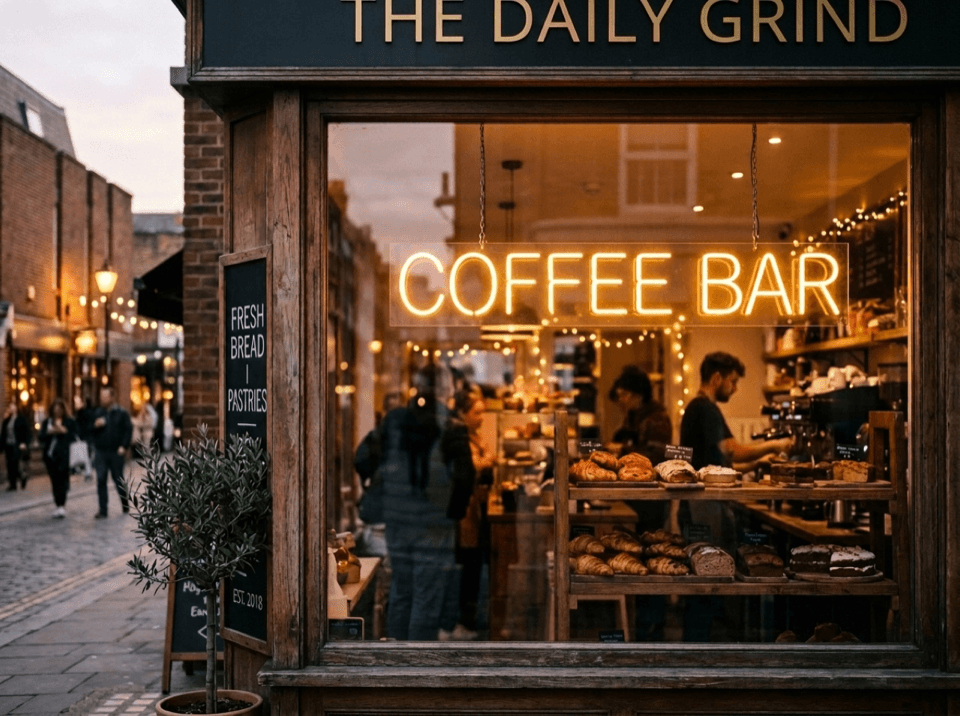
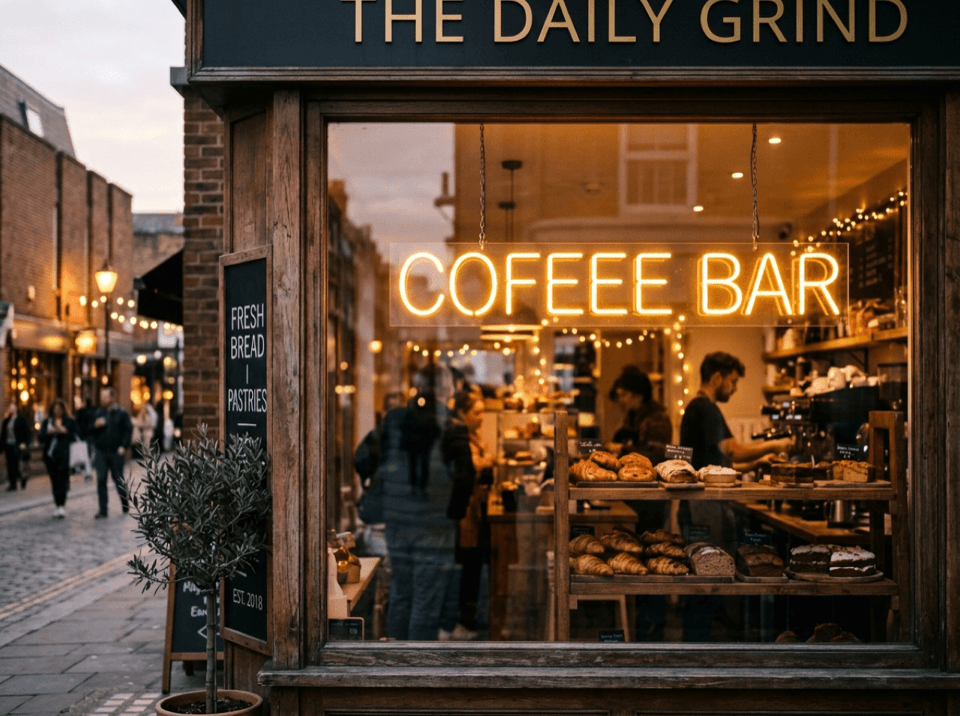
OriginalEdited
AI Neon Typo Fix
Repair Extra Letter in Glowing Bakery Sign
Removes the stray E inside amber glass neon tubing while preserving warm dusk window reflections and pastry shelves.
Editorial visual demo · 4:3 · Glass neon glow
Got a great Midjourney or Flux scene except for one misspelled neon sign or book cover? Draw a box over the broken characters, type the exact spelling, and keep the artwork intact.
ImageTextEditor repairs misspelled or garbled lettering inside Midjourney, Flux, Stable Diffusion, and DALL-E artwork while keeping character faces, composition, and lighting intact. Drag a bounding box directly over the typo so you never have to type broken glyphs, and test 1 free repair with no sign-up.
See how bounding-box repair cleans up doubled letters on glowing glass neon and textured exhibition graphics.
Removes the stray E inside amber glass neon tubing while preserving warm dusk window reflections and pastry shelves.
Editorial visual demo · 4:3 · Glass neon glow
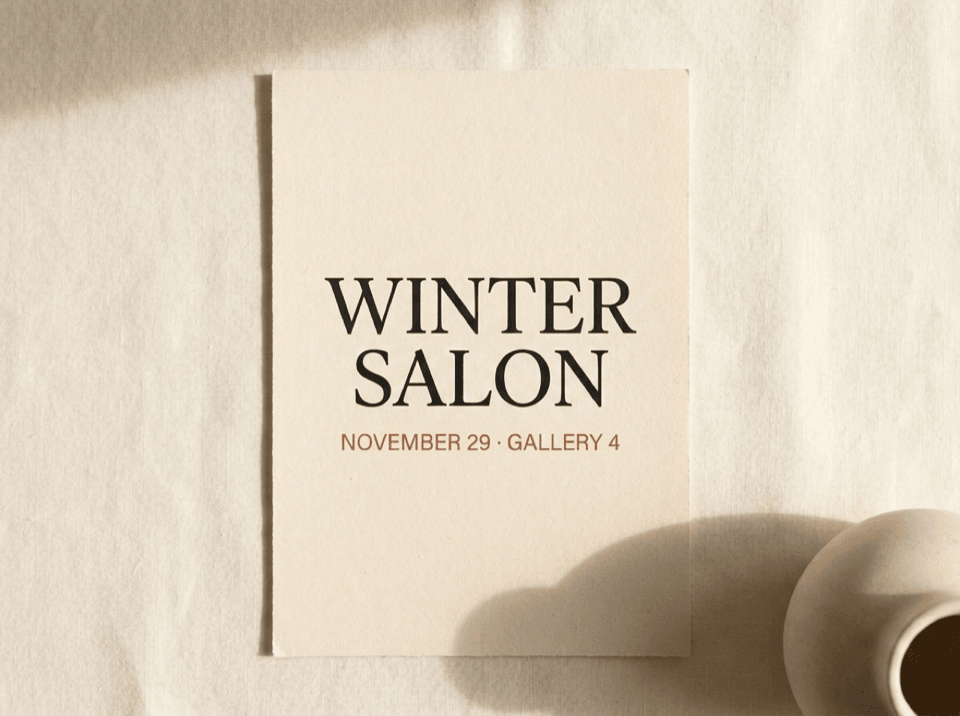
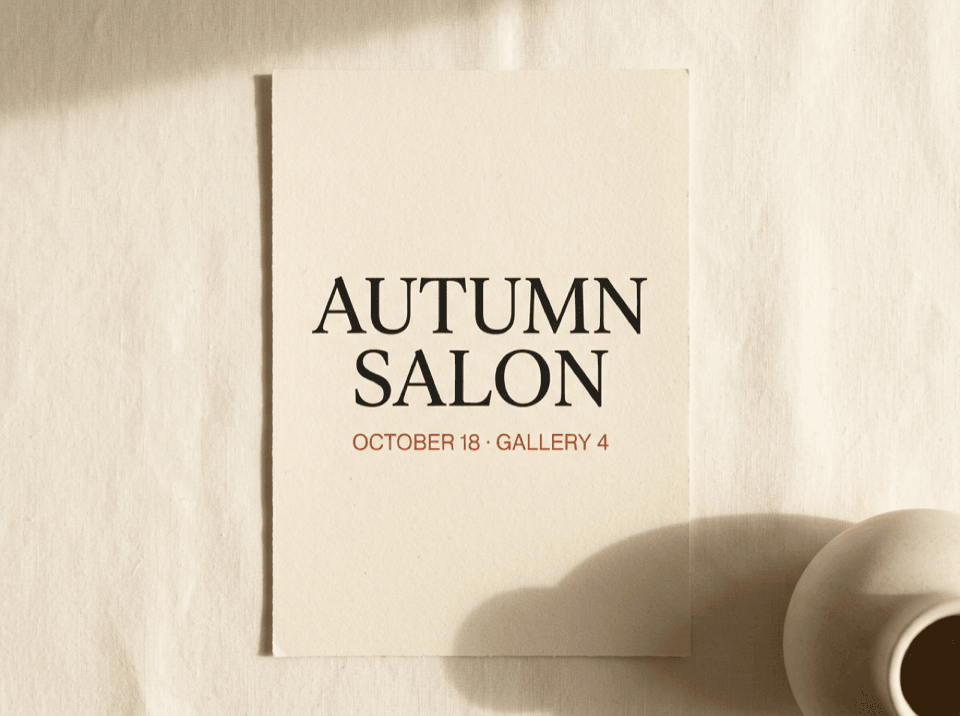
Demonstrates crisp serif glyph repair on textured paper without losing ceramic shadow falloff.
Editorial visual demo · 4:3 · Serif exhibition print
Creators on r/midjourney and r/generativeAI consistently report hitting three walls when trying to rescue a great composition with one bad word.
Regenerating the full prompt alters lighting, character poses, or camera framing just to fix one misspelled word.
Conversational image chatbots frequently re-tokenize nearby faces or soften background details even when asked to touch only text.
Text-only find-and-replace widgets fail when the AI drew alien pseudo-letters that do not exist on a keyboard.
Erasing neon tubes, metallic embossing, or brush ink and pasting flat Helvetica looks detached from the illustration.
Every control is built directly into the workspace above.
Drag a rectangle over broken letters on the preview canvas; ImageTextEditor relies on bounding coordinates rather than fragile OCR.
Matches neon tube glass highlights, gold foil bevels, painted wood brushstrokes, and paper grain directly.
Bounding coordinates paired with strict preservation prompts protect subjects outside the target text zone.
Failed generations auto-refund credits, and Pro 4K mode handles detailed upscaled artwork cleanly.
Drop the PNG or JPEG render directly into the Fix AI Text tab without pre-cropping.
Select only the misspelled letters or wordmark so surrounding illustrations and faces stay locked.
Type the clean word in Exact intended spelling (matching ALL CAPS or Title Case) and note material like "amber glass neon" if stylized.
Slide between Original and Edited to verify spelling and lighting before saving your clean PNG.
Combine tight canvas boxing with short material cues to fix stylized lettering in one pass.
Tighten the drag box closer to the word edges, switch Output resolution to Pro 4K, and make sure the replacement text uses exact target casing.
Expand your bounding box slightly (~10% margin) so the glowing halo blends smoothly into surrounding glass or sky.
Focus on hero headlines, T-shirt slogans, storefronts, and book titles; extremely small background clutter (<8px) is better cleaned with Remove Text.
Checked on 2026-11-21. Compare targeted typo rescue vs. rolling prompts again or manual Photoshop repairs.
| What Matters | ImageTextEditor (Fix AI Text) | Midjourney Vary / Chat AI / Manual |
|---|---|---|
| Handles unreadable alien squiggles | Canvas box selection lets you fix unreadable glyphs without typing the broken characters. | Text-only tools break if the gibberish word cannot be quoted; Midjourney Vary often re-generates another typo. |
| Preserves faces & background art | Locks composition via bounding coordinates and non-target preservation prompts. | ChatGPT/Gemini conversational edits frequently shift character facial details or downscale resolution. |
| Stylized material rendering | Rebuilds neon glow, foil bevels, chalk, and curved ribbons natively into the image. | Canva Grab Text or manual overlays require deleting the glow and pasting flat fonts. |
| Cost to rescue one image | 1 free no-signup trial; $4.90 Quick Pack covers 15 Standard fixes with auto-refund on failure. | Midjourney subscription burns monthly GPU fast hours rolling repeated retries. |
Real inputs, outputs, and day-to-day workflows.
Rescue client pitch visuals without re-rolling lighting or architecture.
Clean up focal display titles while keeping painterly brush details intact.
Avoid awkward flat overlays over wrinkled apparel photography.
Generative edits excel on titles, signs, badges, and 1–6 word headlines rather than dense 100-word AI body blocks.
Always upload the raw PNG exported by Midjourney or Flux rather than a compressed chat screenshot.
For final commercial vector packaging masters, recreate final dielines in Illustrator once the concept is approved.
Moderation blocks any attempt to modify official IDs, certificates, or financial receipts.
Evidence-backed answers specific to fix ai-generated text.
Simply drag a bounding box directly over the broken characters on the uploaded image preview. You can leave the "Garbled letters" field blank and fill in only "Exact intended spelling".
Yes. ImageTextEditor works on any flattened PNG, JPEG, or WebP exported from Midjourney, Flux, DALL-E, Ideogram, or Stable Diffusion.
ImageTextEditor combines explicit bounding-box coordinates with a single-purpose preservation prompt designed to leave faces, poses, and unrelated pixels untouched rather than regenerating the whole scene.
Use Standard (up to 2K) for web previews and switch to Pro 4K (2 credits) when repairing upscaled poster or book cover art.
Yes. Fix the main headline first, download or continue from the result, and run a quick second pass on the next line if the image contains typos far apart.
Each dedicated workflow shares your account credits with zero subscriptions required.
Replace text in flattened images while matching the exact visual font weight, serif curves, surface grain, and shadows—no PSD file or font installation needed.
Image Translation · 20+ LanguagesTranslate text inside PNG, JPG, and WebP graphics across 20+ languages while adapting typography, wrapping longer phrases cleanly, and keeping brand names intact.
Screenshot Editing · Crisp UI TypeUpdate labels, pricing figures, or demo emails inside flat web and mobile screenshots without Inspect Element or Photoshop, while keeping crisp UI borders.